Accessing Usage Statistics
To understand your usage of API features you can access usage statistics both in the Meltwater application, and through the API directly.
Viewing usage in the Meltwater application
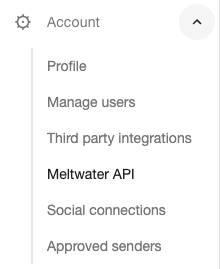
Log into the Meltwater application, then navigate to the Meltwater API page (under the Account menu).
At the top of the Meltwater API page you will see a section named API Usage. Click on See All Usage to continue.

On the Usage Data page you will see multiple charts. You can use the date range selector in the top right to select a time period to view usage for.

The charts on this page include:
- Earned Media Exports - The number of earned media exports you have run
- Earned Media Documents - The number of earned media documents you have retrieved from the platform
- Earned Media Analytics - The API calls you have made to earned media analytics features
- Owned Social Analytics - The number of owned social analytics calls broken down by each analytic endpoint
After loading this page, there is a dropdown menu at the top labelled All Tokens. This indicates that the charts shown include usage across all API tokens in the company. Clicking on the dropdown menu and selecting a token will update the charts to display usage for that specific token:
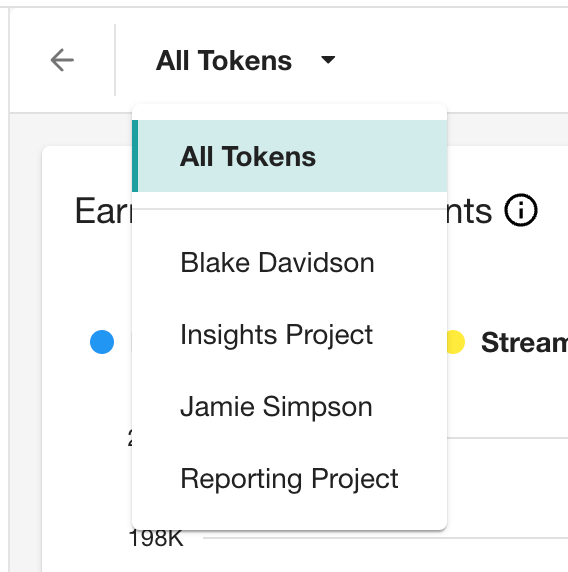
Per-token usage data is available from 3 March 2026 onwards. Usage prior to this date is not broken down by token.
If you do not see the expected token based document count usage for an existing recurring export or stream, then you may need to re-create the recurring export or stream. This will allow any new document count usage to be tracked against the token.
We currently only track Uploaded Documents usage in All Tokens but not under individual tokens.
You can use the API to fetch more detailed statistics, but these charts should help you understand your usage of the main API features.
Accessing usage statistics using the API
You can fetch statistics for your API usage from the API usage endpoints. The data available from the usage endpoints allows you to keep an eye on your usage limits.
Usage periods
The period parameter is common to all the usage endpoints. This parameter can take one of the following values:
24hours- returns the last 24 hours of usage data, broken down by hour7days- returns the last 7 days of usage data, broken down by day30days- returns the last 30 days of usage data, broken down by day12months- returns the last 12 months of usage data, broken down by month
Earned media exports
Exports per month
If you have access to the export feature, you may be subject to a limit on the number of exports you can run in a month.
You can fetch the number of exports you have run by using the GET usage/me/metrics endpoint, specifying the export_count metric and the exports feature.
For instance to fetch the number of exports you have run in the last 30 days:
curl -X GET \
  --url "https://api.meltwater.com/v3/usage/me/metrics/export_count?feature=exports&period=30days" \
  --header "Accept: application/json" \
  --header "apikey: **********"
An example response is:
{
    "units": "day",
    "count": 56,
    "feature": "exports",
    "metric": "export_count",
    "period": "30days",
    "time_series": [
        {
            "timestamp": "2021-09-21T00:00:00Z",
            "count": 2
        },
        {
            "timestamp": "2021-09-20T00:00:00Z",
            "count": 2
        },
        ...
    ]
}
The returned fields are:
feature: the feature requestedmetric: the metric requestedcount: the total usage for the requested period (in this case the total number of exports)units: the time unit used for the breakdown of metricstime_series: the breakdown of usage, wherecountis the usage within each time period (in this case the number of exports)
Documents per month
If you have access to the export or data streaming feature, you are subject to a limit on the number of documents you can export in a month.
For exports, you can fetch the number of documents you have exported by using the GET usage/me/metrics endpoint, specifying the document_count metric and the exports feature.
For searches, you can fetch the number of documents you have received by using the GET usage/me/metrics endpoint, specifying the document_count metric and the search feature.
For data streaming, you can fetch the number of documents you have streamed by using the GET usage/me/metrics endpoint, specifying the document_count metric and the streaming feature.
An example call for exports is shown below:
curl -X GET \
  --url "https://api.meltwater.com/v3/usage/me/metrics/document_count?feature=exports&period=30days" \
  --header "Accept: application/json" \
  --header "apikey: **********"
An example call for search is shown below:
curl -X GET \
  --url "https://api.meltwater.com/v3/usage/me/metrics/document_count?feature=search&period=30days" \
  --header "Accept: application/json" \
  --header "apikey: **********"
An example call for streaming is shown below:
curl -X GET \
  --url "https://api.meltwater.com/v3/usage/me/metrics/document_count?feature=streaming&period=30days" \
  --header "Accept: application/json" \
  --header "apikey: **********"
An example response is:
{
    "units": "day",
    "count": 19044,
    "feature": "exports",
    "metric": "document_count",
    "period": "30days",
    "time_series": [
        {
            "timestamp": "2021-09-21T00:00:00Z",
            "count": 2438
        },
        {
            "timestamp": "2021-09-20T00:00:00Z",
            "count": 1756
        },
        ...
    ]
}
The fields are the same as explained before, except that the count field in this case reflects the number of documents exported.
Earned media analytics & search
The recently added earned media search feature is limited in the same way as earned media analytics features. Calls to the search feature are counted towards your daily analytics call limit.
Daily calls
If you have access to analytics through the API you will be limited to a number of analytics calls per day.
You can fetch the number of analytics requests you have made by using the GET usage/me/requests endpoint. This returns the number of requests you have made to all API endpoints.
For instance to fetch the number of API calls you have made in the last 30 days:
curl -X GET \
  --url "https://api.meltwater.com/v3/usage/me/requests?period=30days" \
  --header "Accept: application/json" \
  --header "apikey: **********"
An example response is:
{
    "units": "day",
    "count": 60,
    "time_series": [
        {
            "timestamp": "2021-09-21T00:00:00Z",
            "calls": {
                "v3": {
                    "analytics": {
                        "summary": {
                            "count": 1
                        },
                        "top-keyphrases": {
                            "count": 1
                        }
                    },
                    ...
                }
            }
        },
        ...
    ]
}
The returned fields are:
units: the time unit used for the breakdown of the metricscount: the total usage for the requested period (in this case the total number of all API requests)time_series: the breakdown of API call usage
Within each item of the timeseries the response includes the usage for each API endpoint. So in the example above the analytics summary endpoint was hit once within the report period.
All API calls (including Owned Social analytics and Explore+ API features)
You can make the same call as explained in the Daily analytics calls section above. This will return details for all your calls to API endpoints.
The GET usage/me/requests endpoint returns your API usage for all API endpoints. You can use the same request shown above for analytics calls to look at your usage.
Filtering by API Token
All usage endpoints accept an optional token_id query parameter. When provided, the response will only include usage for the specified API token. If omitted, usage across all API tokens in the company is returned.
You can find the ID of each API token by using the list tokens endpoint.
For example, to fetch export usage for a specific API token:
curl -X GET \
  --url "https://api.meltwater.com/v3/usage/me/metrics/export_count?feature=exports&period=30days&token_id=YOUR_TOKEN_ID" \
  --header "Accept: application/json" \
  --header "apikey: **********"