Example: Social insight sub-agent
This guide walks through an example that uses Meltwater MCP in a different way from most. Instead of building a whole agent on Meltwater, you already have (or are building) your own agent, and Meltwater slots in as a specialist insight sub-agent it delegates to - alongside your own data and tools.
The scenario: a marketer asks your agent to shape a social campaign. Your agent asks the Meltwater sub-agent for a grounded landscape insight, then authors the campaign brief from it. Meltwater supplies the insight; your agent does the creative.
The reusable asset here is the contract between the two agents - not the demo brand. If you take one thing from this example, take the request/payload shape below.
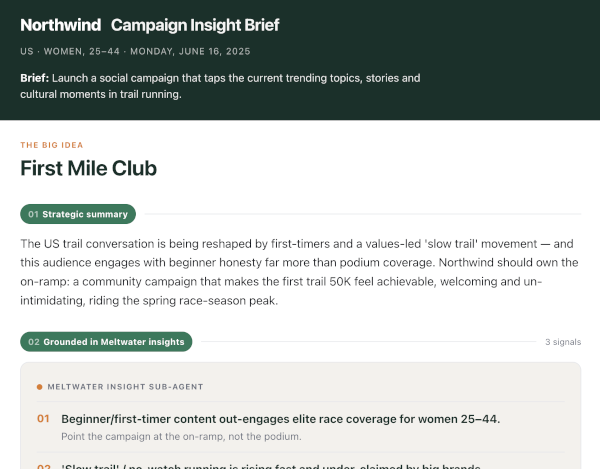
The full example lives on GitHub: meltwater-api-examples/meltwater-mcp/social-brief-subagent. This guide summarises what it does and how to run it; the repository README has the complete spec.
What it does
  MARKETER REQUEST
    ──▶ YOUR ORCHESTRATOR (mock - your own agent; NO Meltwater access)
        ──▶ MELTWATER INSIGHT SUB-AGENT (Claude + Meltwater MCP tools)  ──▶  INSIGHT PAYLOAD
    ──▶ YOUR ORCHESTRATOR authors the CAMPAIGN BRIEF from the insights
    ──▶ RENDER (render.py)  ──▶  brief.html
| Step | Who | Meltwater MCP tool | What happens |
|---|---|---|---|
| Resolve search | Meltwater sub-agent | a saved-search list tool | Lists your searches and proposes the best match - but grounds on the configured ID (see below) |
| Shape & mood | Meltwater sub-agent | unified_retrieval_statistics_retrieval_tool | Volume trend, sentiment, top sources and themes |
| Driving stories & social | Meltwater sub-agent | unified_retrieval_document_retrieval_tool | Highest-reach articles and highest-view posts (query:"*") |
| Synthesise insight | Meltwater sub-agent | (reasoning) | Trends, cultural moments, notable voices, whitespace for the brand |
| Author the brief | Your orchestrator | (none - no Meltwater access) | Concepts, formats, hashtags, channels, timing - the creative |
The Meltwater sub-agent reasons over the results and emits a structured insight payload. Your orchestrator turns that into a campaign brief, which a small renderer turns into a single flat HTML file - exec-ready, prints straight to PDF, and works in any browser with no bundler, external fonts, or client-side JavaScript.
The division is enforced by architecture: your orchestrator is handed only the insight payload - it never sees a Meltwater tool. So Meltwater is unambiguously the insight source, and your agent does the brief.
Why build it this way?
This is the pattern for when you are building your own agent platform and want best-of-breed insight services to plug into it, rather than working inside someone else's agent. Meltwater becomes a specialist sub-agent your orchestrator delegates media-intelligence tasks to - a deeper integration than a dashboard, and one your agent composes with your own data and tools.
The contract
This is the point of the example. Your agent sends the sub-agent a request, and gets back an insight payload - insights only, no creative.
Request in - what your agent sends the sub-agent:
{
  "brand": "Northwind Athletic",
  "market": "US",
  "interestArea": "Trail running",
  "audience": { "label": "Women, 25-44" },
  "objective": "Launch a social campaign that taps current trends in trail running.",
  "timeframe": "last 30 days",
  "savedSearch": { "id": "SAVED_SEARCH_ID_LANDSCAPE" }
}
These are the same field names as the campaign config in Make it your campaign below - in this example the config is the request. Note that the standalone example passes these to the sub-agent as fields in its prompt rather than as a JSON request body, so when you wire the sub-agent into a real orchestrator the transport and field names are yours to choose; what matters is that the sub-agent receives all of the above.
Insight payload out - what the sub-agent returns (landscape intelligence only - no concepts, copy, or channels):
landscapeSummary- the state of the conversation right now.trendingTopics- topics with a why-now and a volume/sentiment signal.culturalMoments- moments and why they matter.audienceResonance- what the audience lens suggests lands, or falls flat.notableVoices- creators and outlets driving the space.sentimentMood- overall and by theme.whitespaceForBrand- angles the brand could authentically own, each with an authenticity check.evidenceAppendix- every claim traced back to something Meltwater returned.
The sub-agent never writes the brief - your agent turns the payload into the campaign brief the marketer sees. A standalone run writes both JSON files next to the HTML, so you can inspect both sides of the contract.
Ways to run it
- In Claude Code (no code) - quickest. Let Claude Code act as both agents in sequence using your connected Meltwater MCP server. It reads the repo's
CLAUDE.md, plays the two roles, and renders the HTML. This is the best way to get a first look - seeRUNNING-IN-CLAUDE-CODE.mdin the repo. - Standalone (this repo).
social_brief_subagent.pyruns entirely in your own process using the Anthropic SDK and the MCP client. The insight sub-agent half is the piece you would wire into your real orchestrator.
What you'll need
For a standalone run you need two credentials, both supplied through the environment (the code never hardcodes a key):
- An Anthropic API key - the agents' reasoning. Create one at console.anthropic.com (Settings → API Keys) and set
ANTHROPIC_API_KEY. - A Meltwater API token - access to your Meltwater data. Set
MELTWATER_API_TOKEN. See API Credentials if you need to create one, and Connecting to Meltwater MCP for how the token is used to authenticate against the MCP endpoint.
Meltwater authentication is a single seam in the code: set the token and it runs end-to-end. When Meltwater's per-user OAuth clients are available, you swap the static token for an OAuth credential - same code, different credential.
The sub-agent calls the live Meltwater MCP server, so you need Meltwater MCP in your subscription. The exact tools available depend on the products in your package. See the Overview or talk to your account team.
Quickstart (standalone)
From the social-brief-subagent directory:
uv sync                                                   # install deps (anthropic[mcp], python-dotenv, mcp)
cp .env.example .env                                      # add ANTHROPIC_API_KEY and MELTWATER_API_TOKEN
uv run python social_brief_subagent.py --out brief.html
open brief.html                                           # then "Save as PDF" from the report
The run writes three files next to brief.html: brief.insight.json (what Meltwater returned), brief.brief.json (what your agent produced), and brief.html (what the marketer sees).
To iterate on the template or design without touching Meltwater, render a sample brief directly:
uv run python render.py sample_output/sample_brief.json --campaign campaigns/example-campaign.json --out sample_output/brief.html
Make it your campaign
Everything campaign-specific lives in one JSON file - fork campaigns/example-campaign.json:
brand/wordmark- identity on the brief.market/interestArea/audience.label/objective- the request the sub-agent grounds on.savedSearch.id- your Meltwater landscape saved-search ID (the wider interest-area conversation, not your brand mentions; the brand enters only as a whitespace lens).theme- optional colours, injected as CSS variables so you can restyle the brief without touching the template.
Point the sub-agent at your copy with --campaign path/to/campaign.json (or the CAMPAIGN_CONFIG environment variable).
- Search resolution is a convenience, not the authority. The sub-agent lists your searches and proposes the best match, but it grounds on the configured
savedSearch.id. A confident-but-wrong auto-pick would silently ground the whole brief on the wrong data, so point the config at the search you mean and treat the proposal as a helper. - Audience is a lens, not a filter. Meltwater captures authors and mentions, not the demographics of who reads content, so "Women, 25-44" shapes how the insight is interpreted - it is not a hard data filter.
- The one query trick: the sub-agent always pairs
query:"*"with the saved-search ID. The saved search is the sole authority on relevance; a descriptive query string alongside it triggers a semantic re-rank that suppresses high-reach and high-view posts.query:"*"disables that so results sort purely by the requested metric.
What's next
A few natural extensions, sketched in the repo but not built:
- A hosted skill. Today the Meltwater sub-agent is Claude plus the raw retrieval tools and an analyst prompt. As Meltwater ships composed skills, you would swap that for a hosted
get_social_brief- same contract, less code to own. - A standing watch. The flip side of this pattern - a sub-agent that proactively surfaces on-brand opportunities into your orchestrator, rather than answering on request.
- First-party fusion. Fuse your own data (campaign calendar, prior performance) into the brief for the insight neither source produces alone.
Getting help
If you have any questions, take a look at the FAQs page. If you need further help, please reach out to our Support team.