Example: Executive media brief
This guide walks through a complete example agent built on Meltwater MCP. It shows how to build your own agent that uses Meltwater MCP to produce a finished, branded executive daily media brief - news and social, selected, ranked and rendered - and deliver it headless, every morning, before anyone's awake.
It is a deliberately accessible starting point: pure Meltwater, one credential, and a great-looking artifact on day one. Use it as a template for your own agents rather than a product to run as-is.
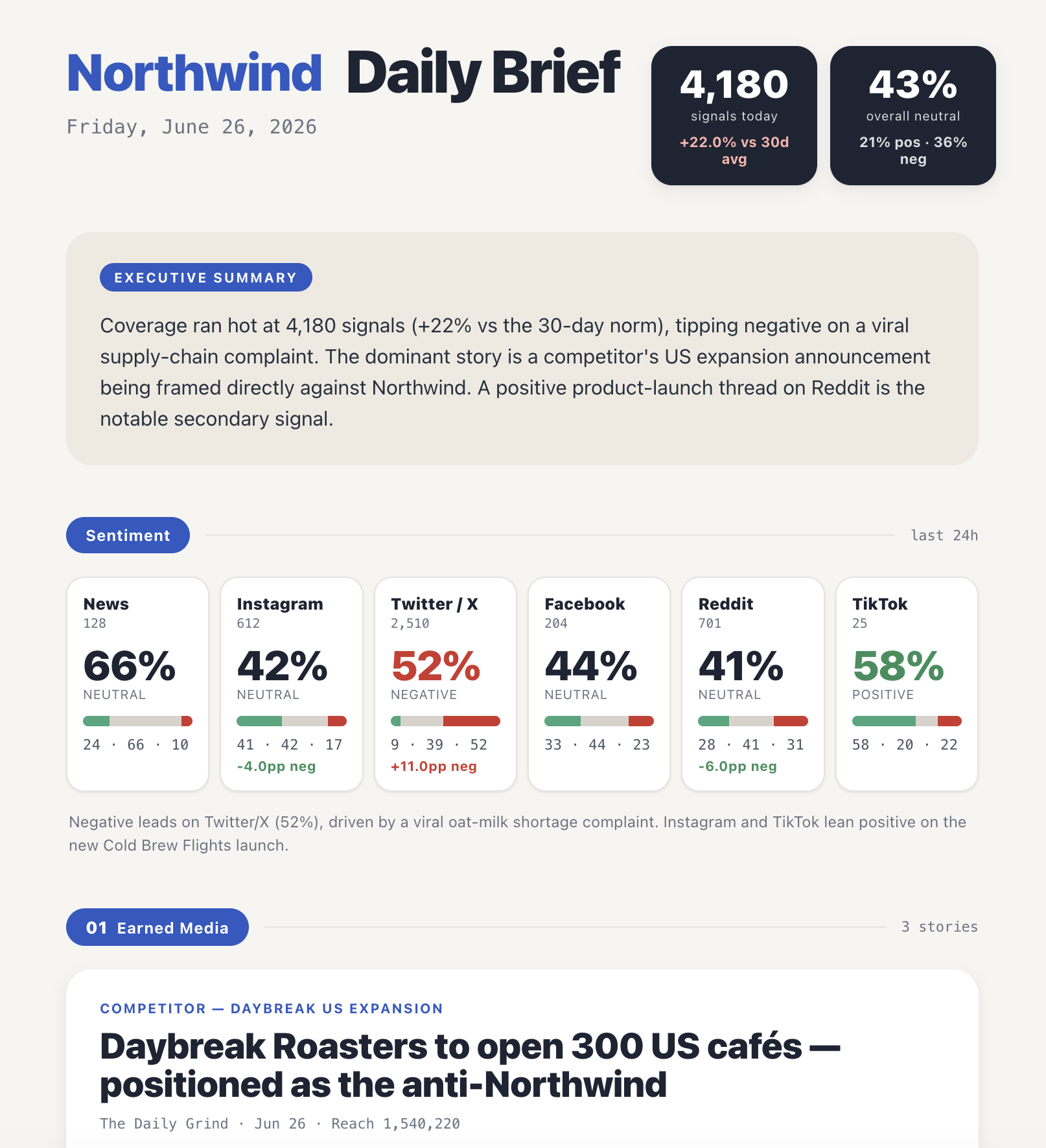
The full example lives on GitHub: meltwater-api-examples/meltwater-mcp/exec-media-brief. This guide summarises what it does and how to run it; the repository README has the complete spec.
What it does
The agent runs a simple three-stage pipeline:
COLLECT (Meltwater MCP) ──▶ BRIEF (JSON) ──▶ RENDER (HTML) ──▶ deliver
It uses just two Meltwater MCP tools to gather everything it needs:
| Step | Meltwater MCP tool | What it gets |
|---|---|---|
| Volume vs norm | unified_retrieval_statistics_retrieval_tool (count by day) | Today's volume vs the 30-day baseline - the "hot day" signal |
| Sentiment | unified_retrieval_statistics_retrieval_tool (sentiment breakdown) | Positive / neutral / negative, overall and per platform |
| Top sources | unified_retrieval_statistics_retrieval_tool (top sources) | Who's driving coverage |
| Headlines | unified_retrieval_document_retrieval_tool (sortBy reach) | Earned-media lead and stories |
| Earned social | unified_retrieval_document_retrieval_tool (sortBy views) | UGC ranked by views, with per-platform floors |
| Competitors | unified_retrieval_document_retrieval_tool + competitor saved search | Competitor news and social share-of-voice |
A third tool, unified_retrieval_query_gen_tool, is attached as a fallback for when no saved search exists - with saved searches configured it is never called.
The model reasons over the results, applies a set of editorial rules, and emits one structured brief as JSON. A small renderer turns that into a single flat HTML file - exec-ready, prints straight to PDF, and works in any browser or email client with no bundler, external fonts, or client-side JavaScript.
Why build an agent for this?
You could assemble a brief like this by hand in a chat. The reason to build it as an agent is headless orchestration and delivery: it runs on a schedule in your infrastructure, assembles the brief, and pushes it to your channel - with no human in a chat. That "runs itself and lands in the inbox every morning" loop is what makes it worth building.
This also demonstrates the developer-first pattern Meltwater MCP is designed for: you bring the reasoning, planning, and orchestration, and Meltwater MCP provides reliable, composable tool access to your data.
Ways to run it
There are two ways to run the example, depending on how far along you are:
- In Claude Code (no code) - quickest. Let an MCP client act as the agent using your connected Meltwater MCP server. It reads the instructions in the repo's
CLAUDE.md, calls the Meltwater tools, and renders the HTML for you. This is the best way to get a first look - seeRUNNING-IN-CLAUDE-CODE.mdin the repo. - Standalone (the production path).
exec_media_brief.pyruns entirely in your own process using the Anthropic SDK and the MCP client. This is the schedulable version you would deploy to cron, a Lambda, or Cloud Run.
What you'll need
For a standalone run you need two credentials, both supplied through the environment (the code never hardcodes a key):
- An Anthropic API key - the agent's reasoning. Create one at console.anthropic.com (Settings → API Keys) and set
ANTHROPIC_API_KEY. - A Meltwater API token - access to your Meltwater data. Set
MELTWATER_API_TOKEN. See API Credentials if you need to create one, and Connecting to Meltwater MCP for how the token is used to authenticate against the MCP endpoint.
Meltwater authentication is a single seam in the code: set the token and the agent runs end-to-end. When Meltwater's per-user OAuth clients are available, you swap the static token for an OAuth credential - same code, different credential.
The agent calls the live Meltwater MCP server, so you need Meltwater MCP in your subscription. The exact tools available depend on the products in your package. See the Overview or talk to your account team.
Quickstart (standalone)
From the exec-media-brief directory:
uv sync                                   # install deps (anthropic[mcp], python-dotenv, mcp)
cp .env.example .env                      # add ANTHROPIC_API_KEY and MELTWATER_API_TOKEN
uv run python exec_media_brief.py --out brief.html
open brief.html                           # then "Save as PDF" from the report
To iterate on the template or design without touching Meltwater, render a sample brief directly:
uv run python render.py sample_output/sample_brief.json --out sample_output/brief.html
The repo's sample_output/brief.html shows what a finished brief looks like, using a fictional demo brand.
Make it your brand
Everything brand-specific lives in one JSON file - fork brands/example-brand.json and point it at your own Meltwater assets:
name/wordmark/logoUrl- the masthead identity.savedSearches.brandandsavedSearches.competitors- your Meltwater saved-search IDs. Create these in Meltwater first; they define what "your coverage" and "competitors" mean. The saved search is the authority on relevance.competitors- the watchlist for the competitor section.floors- per-platform inclusion thresholds (views for social, reach for the rest).theme- optional colours and fonts, injected as CSS variables so you can restyle the whole brief without touching the template.
Point the agent at your copy with --brand path/to/brand.json (or the BRAND_CONFIG environment variable).
Always pass query:"*" together with a saved-search ID. The saved search is the sole authority on relevance; adding a descriptive query string triggers a semantic re-rank that suppresses high-reach and high-view posts. query:"*" disables that re-rank so results sort purely by the metric you asked for (views or reach). This is baked into the agent's instructions - it is the single most useful thing to know when building your own retrieval agent on Meltwater MCP.
Adapt it to your use case
- Fork the brand config and point the saved searches at your brand.
- Schedule
exec_media_brief.py(cron, Lambda, or Cloud Run) for a daily headless run. - Add a delivery step after the render - post to Slack, email it, or drop it on a file host. The agent ships without one; the deliverable is the HTML file.
A natural next step, sketched in the repo but not built, is first-party fusion: overlay your own owned-content calendar, campaign timeline, or CRM so the brief can say something neither source produces alone - for example, "heavy negative on X - note our post on X ships at 2pm, consider holding." This example is deliberately single-source to stay simple; fusing in your own data is where a custom agent starts to earn its keep.
Getting help
If you have any questions, take a look at the FAQs page. If you need further help, please reach out to our Support team.